







Zoho Sites allows businesses to build a Website without starting with coding. But for a business Website, the important part is not only the interface. When customers fill out a Form to register for a consultation, request a quotation or leave their contact information, that data needs to go to the right place so the Sales team can continue handling it.
This is when a Website becomes part of the Lead generation process instead of simply being a place to introduce the business. With Zoho Sites, businesses can build a Website, create Forms and connect data with tools in the Zoho ecosystem to create a more seamless workflow.
Zoho Sites Is Suitable for Businesses That Need to Build a Website Quickly and Easily Manage It
A business Website does not necessarily need to start with a complex development project. For SMEs, what matters more is being able to build a Website that is professional enough, easy to update and suitable for business needs.
Zoho Sites provides a drag and drop Website builder that allows users to create and edit elements directly on the page without requiring in depth programming knowledge. Businesses can choose a Website template and adjust the layout, content and elements based on their needs.
This approach helps shorten the gap between the person building the Website and the person directly managing its content. When information about services, images or content on the page needs to be changed, the business can make the changes itself instead of depending entirely on the technical team.
For a B2B Website, this is a significant advantage because content often changes based on products, services, programs or Marketing campaigns.
From Website to Form: Turning Visits into Leads
A beautiful Website that does not generate the next action will have limited direct contribution to the business process. For a business Website, one of the most important actions is collecting information from interested customers.
Zoho Sites allows businesses to add Forms to their Website so customers can submit information such as their full name, Email, phone number or consultation needs. Forms can be placed in suitable positions along the visitor journey, such as the contact page, service page or Landing Page.
One point to pay attention to is that a Form should not be created simply to “have a place for customers to enter their information.” The fields should be selected based on the purpose of using the data. If the goal is to receive consultation requests, businesses should only collect the information necessary for Sales to understand the initial needs and continue the conversation.
When designed correctly, a Website will not only provide information but also become the starting point of the Lead generation process.
How to Sync Forms to Zoho CRM?
This is the part that creates greater value for businesses using Zoho CRM.
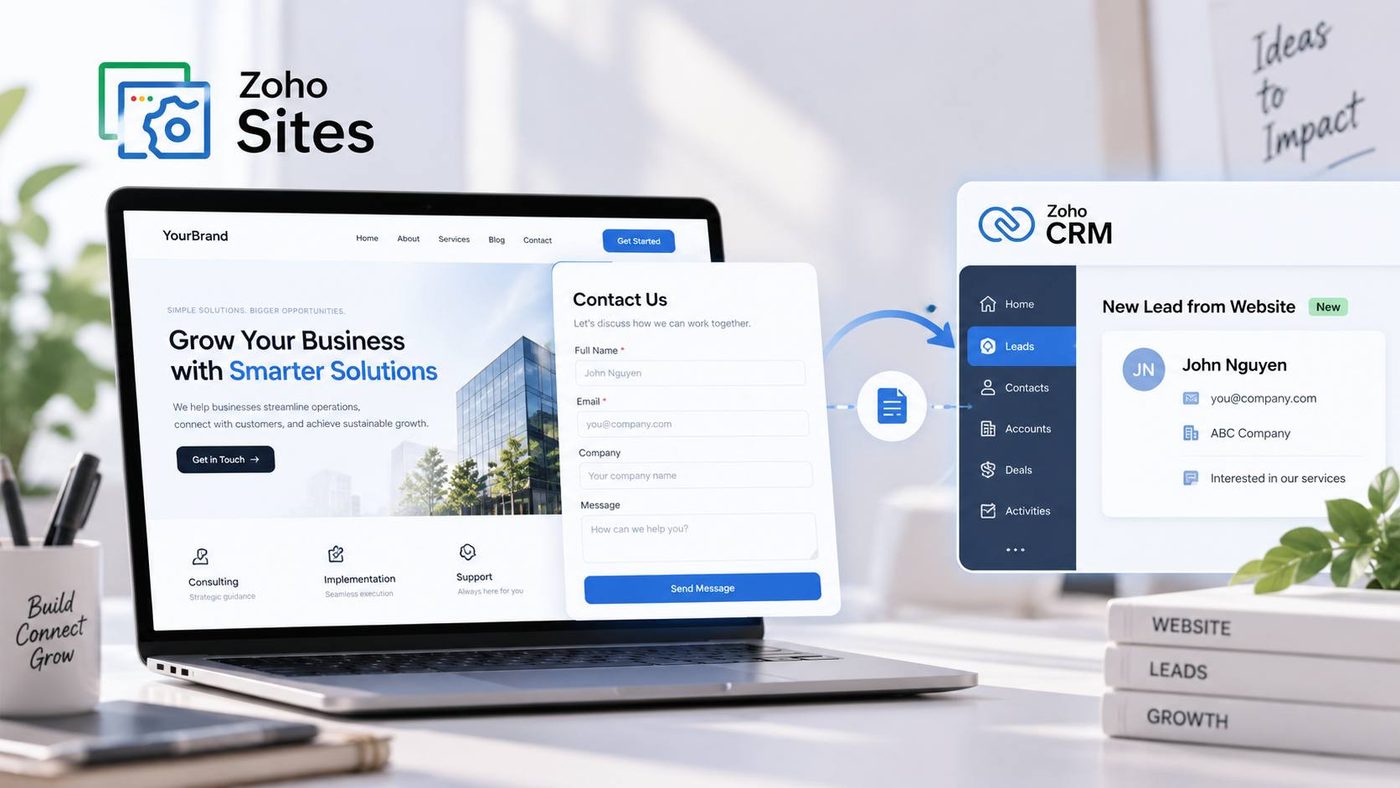
Instead of having employees check each Form and manually enter customer information into CRM, businesses can connect the Form on their Website with Zoho CRM. According to Zoho’s guidance, the integration can be set up without writing code. Businesses connect their CRM account, select a Campaign and then map the Form’s data fields to the corresponding fields in CRM.
For example, the Full Name field on the Form can be mapped to the Lead name field in CRM. Email, phone number or information about customer needs can also be mapped accordingly.
After setup, customer data submitted through the Form can be sent to the Leads module in Zoho CRM. Businesses can also configure how duplicate records are handled and use tags to classify data according to the Lead management process.
The basic flow can be visualized as follows:
Customer visits Website → Fills out Form → Data is sent to Zoho CRM → Sales receives and processes the Lead

The important point here is that the business is not simply “receiving a Form.” Data from the Website is sent to the right customer management system, creating the conditions for the next step of the Sales process to be carried out more quickly and systematically.
Set Up Forms According to the Right Process Instead of Connecting Them Just for the Sake of It
Connecting the Website to CRM is only the first step. If the business does not determine in advance how Leads will be handled, the data sent into CRM can still end up being overlooked.
Before setting up the Form, it is important to clearly determine what purpose it serves and which process the Lead will enter after being created. A Form for a quotation request may require a different handling process from a Form for a consultation request or a Form for downloading materials.
Businesses should also standardize the data fields between the Website and CRM from the beginning. Information that Sales actually needs should be prioritized, while fields that do not serve the purpose of processing Leads should not be added to the Form simply to collect more data.
If the business runs advertising campaigns, tracking Lead sources also becomes important. Zoho LandingPage supports tracking Marketing sources through UTM or GCLID when connected with Zoho CRM. For Websites and campaigns that need to measure traffic sources, this provides a basis for businesses to understand where Leads come from and evaluate Marketing effectiveness more effectively.
The Website Is No Longer a Standalone System
When the Website is connected to CRM, its role changes significantly.
Instead of simply having a business introduction page and a contact Form at the bottom of the page, the Website becomes an entry point for customer data. Information is collected at the point where the customer develops a need and then continues into the system that the Sales team is using.
This is especially suitable for SMEs because businesses can start with a relatively simple structure: a Website to build their digital presence, a Form to collect Leads and CRM to manage the next stages. As needs increase, the business can expand the process without having to rebuild the entire foundation from scratch.
Therefore, when building a Website with Zoho Sites, businesses should not only ask, “Does the Website look good?” The more important question is “After a customer takes an action on the Website, where will the data go and who will handle it?”
A professional Website needs more than a good appearance and ease of use. It needs to connect with the way the business sells and takes care of customers. When Forms are sent to the right system, the Website begins to become a real part of the Lead generation and management process.
That is also how Zoho Sites delivers value within the Zoho ecosystem: starting with building a Website, collecting customer information and gradually connecting the Website with the business activities behind it.