





Where Do Zoho CRM and Salesforce Differ?
When choosing CRM software, businesses need to consider not only its features but also the user experience for employees and the complexity of implementing the system. An accessible platform helps employees get up to speed quickly, while extensive customization capabilities allow businesses to build workflows that closely match their own operating models.
Zoho CRM focuses on making common customer management and sales activities convenient. Salesforce offers broader customization capabilities for organizations with complex business requirements. These differences affect interface design, training time and the resources needed to manage the system.
UX/UI and Implementation Difficulty Comparison
User Experience: Simplicity or Flexibility?
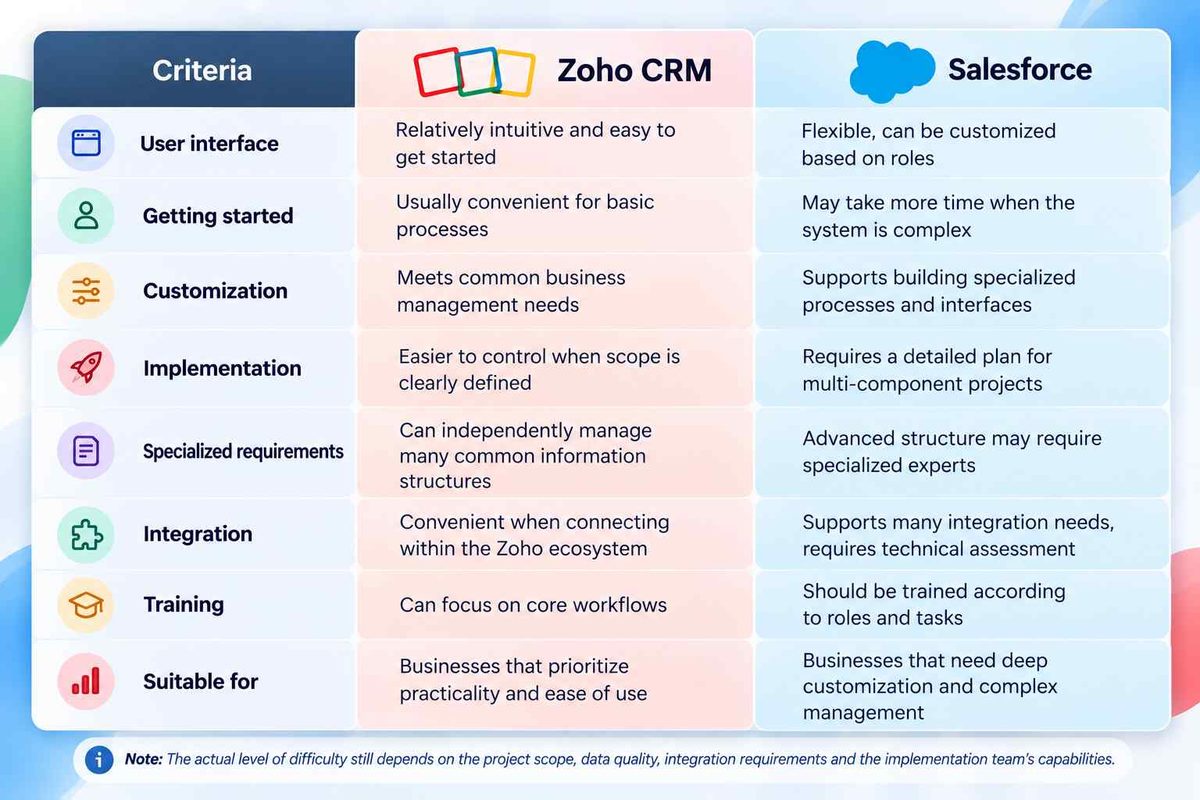
Zoho CRM organizes features such as leads, contacts, accounts and sales opportunities into separate sections. Employees can track deal progress, update information and record customer service activities within the same system. For businesses transitioning from spreadsheets to CRM, this structure makes workflows easier to understand and reduces the initial learning curve.
In addition, administrators can adjust data fields, page layouts and process rules to meet business needs. Companies do not have to configure every feature from the beginning. Instead, they can start with essential workflows and expand as needed. However, the interface is only truly effective when information is organized logically and employees understand which data they need to update.
Salesforce stands out for its ability to tailor the user experience to different user groups. Sales representatives can focus on deal information and next steps, while managers use reports and dashboards to monitor performance. This approach is useful for businesses with multiple departments and different management requirements.
On the other hand, extensive customization requires careful design. If the system contains too many fields, inconsistent workflows or layouts that do not match actual work requirements, users may struggle even when the platform offers comprehensive functionality. Therefore, Salesforce delivers the best results when its interface is designed around the specific needs of each role.
Implementation Difficulty and Technical Expertise Requirements
With Zoho CRM, businesses can start with customer management, sales opportunity tracking and customer service features. When workflows are clearly defined, the implementation scope is limited and data is standardized, configuration is generally easier to manage. After receiving appropriate guidance, administrators can also make many routine changes themselves, such as updating information fields or adjusting workflows.
However, Zoho CRM still needs to be implemented based on specific business requirements. If a company wants to automate multiple steps, connect external applications or establish access permissions across several levels, the team must conduct thorough analysis and testing. Choosing an accessible platform does not eliminate the need to standardize workflows before implementation.
With Salesforce, the workload often increases when a project involves multiple cross departmental processes, a custom data model or complex integration requirements. The implementation team must consider the relationships between data, access permissions, automation and reporting to minimize conflicts during operation. Advanced configurations may require an experienced Salesforce administrator or technical specialist.
Businesses should therefore account for the resources needed to maintain the system after handover. Beyond the initial implementation costs, they need to determine who will manage user accounts, update configurations, resolve issues and control system changes. This is an important factor in ensuring that the system continues to meet business needs as the organization grows.
Should You Choose Zoho CRM or Salesforce?
Zoho CRM is suitable for businesses that want to standardize sales processes, centralize customer data and implement CRM in stages. It is worth considering when a business prioritizes ease of use, wants to manage routine changes independently and does not yet require highly complex business customization.
Salesforce is better suited to organizations that need to design specialized workflows, coordinate operations across multiple departments or meet advanced integration and data management requirements. However, businesses need to prepare adequate resources for business analysis, training and long term system management.
Before making a decision, businesses should identify the processes they need to manage, their integration requirements and the capabilities of the team responsible for the system. Testing a real workflow on the intended platform can provide a clearer assessment of usability, business fit and the effort required for ongoing operations.
No single platform is suitable for every business. The most effective choice is a system that balances user experience, management requirements and growth objectives. WBLGroup works with businesses to assess their needs, select the right solution and develop a CRM implementation roadmap that fits their actual operations.