







Connect WordPress Website with Zoho Bigin helps businesses automate the Lead collection process right from the point where customers leave their information. Instead of having a Form on the Website simply send data to Email and wait for employees to check and manually re enter it, customer information can be recorded directly in the management system, helping Sales receive and process Leads faster.
The Website can bring customers in, but its real value only begins when their information is sent to the right system. With Zoho Bigin, businesses can connect Forms on a WordPress Website with the customer management system to create a seamless data flow from Website to Lead and Sales
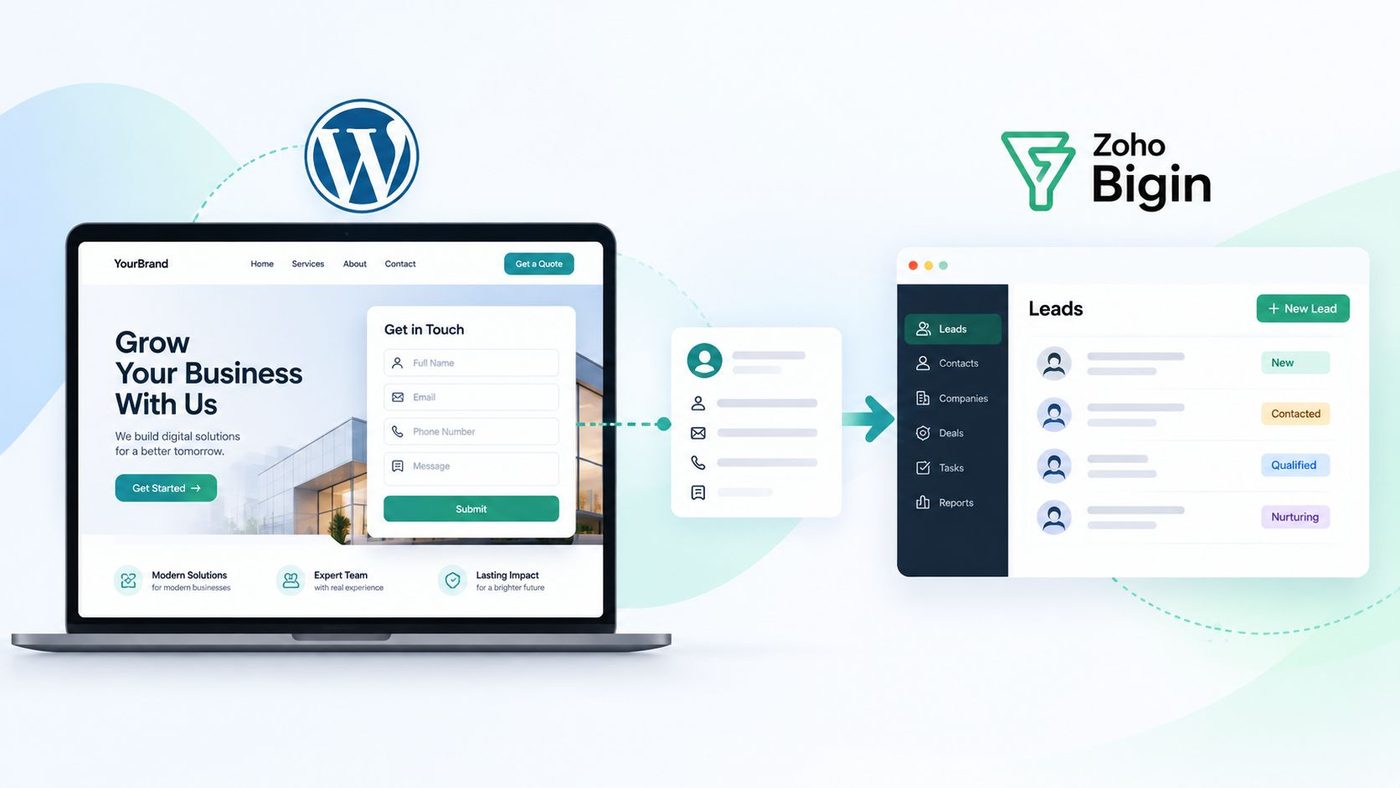
Does Your Website Have Customers Filling Out Forms but Data Is Still Processed Manually?
A Website with Traffic does not necessarily create an effective Sales process. When customers leave their information through a consultation Form, quotation request or contact request, that data needs to be sent to the right person and processed within an appropriate timeframe.
A common approach in many businesses is for customers to fill out a Form on the Website, with the information being sent to Email. Employees then check it, copy the data into Excel or another system and only then pass it to Sales. This process may still work when the number of Leads is small, but as the number of customers increases, the possibility of missing or entering data incorrectly also increases.
This is exactly the gap that connecting a WordPress Website with Zoho Bigin can address. Instead of treating the Form simply as a place to receive information, businesses can turn it into the starting point of a systematic Lead collection and management process.
How Can Zoho Bigin Receive Data from Forms on a Website?
Zoho Bigin provides Bigin Forms, which allows businesses to create Forms to collect customer information and embed them directly into a Website. When customers submit a Form, the data can be automatically added to the corresponding management areas in Bigin, such as Contacts or Pipelines.
What is worth noting is that businesses do not necessarily need to build a complex integration system. Bigin provides embed code for Forms, including iframe code, to place Forms on a Website. For a WordPress Website, the basic process is to create a Form in Bigin, obtain the embed code and place it in the appropriate area of the Website. Zoho also provides official instructions for adding Bigin Forms to WordPress through the Custom HTML block.
The data flow can therefore be visualized simply as follows:
Customer visits Website → Fills out Form → Submits information → Data is recorded in Zoho Bigin → Sales receives and processes it
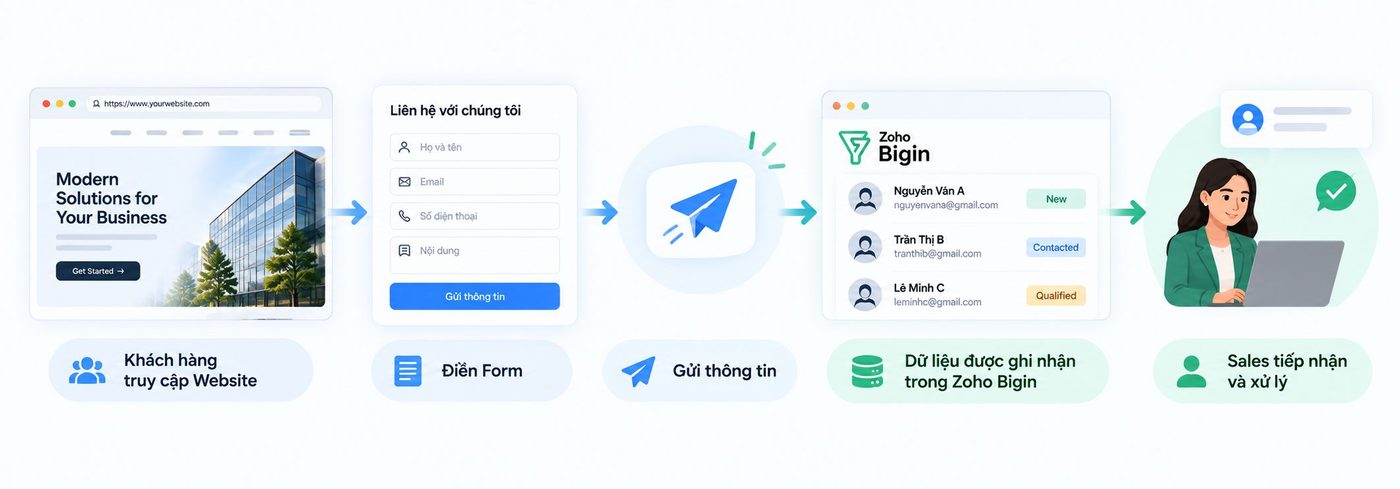
The important point here is not that the Website has an additional Form, but that the Form has become part of the Lead management system.
How to Connect a WordPress Website with Zoho Bigin
To set up the connection, businesses can start directly from Bigin instead of having to find an intermediary tool.
Step 1: Create a Form in Zoho Bigin
In Bigin, access the Forms section and create a new Form. Businesses can choose the information fields they need to collect, such as full name, Email, phone number, requirements or other information necessary for the consultation process.
Bigin allows businesses to customize data fields, set required fields, add CAPTCHA and configure the content displayed after customers submit the Form. Businesses can also set certain values to be automatically entered into the record, such as the Lead source being Form, to reduce data entry later.
This is a step that should be carefully defined before placing the Form on the Website. More fields are not necessarily better. The Form should only request information that is truly necessary for the next step of the Sales process.
Step 2: Get the Form Embed Code
After completing the design, Bigin provides options to share the Form as a link, QR code or Website embed code. For WordPress, businesses can use the iframe code provided in the Form sharing section.
Using embed code allows the Form to appear directly on the Website without requiring the business to rebuild the entire data collection mechanism itself.
Step 3: Add the Form to the WordPress Website
In WordPress, open the page where the Form needs to be placed, add a Custom HTML block and paste the iframe code obtained from Bigin into the desired position. This is also the process Zoho directly recommends for WordPress Websites.
After publishing, customers can see and fill out the Form directly on the Website. When they submit their information, the data is sent to Bigin according to the Form configuration instead of requiring an employee to manually copy the data.
If the Website uses another page builder on WordPress, the method of placing the code may vary depending on the tool being used. However, the principle remains the same: the Form is placed on the Website, while the data is recorded in the customer management system.
Lead Automation Is Not Just About Automatically Receiving Data
Connecting the Form with Bigin is only the first step. The greater value lies in continuing to build the handling process after the Lead has been recorded.
Bigin allows businesses to set up automated actions when data is created from a Form. Businesses can assign responsible users, manage duplicate data, add tags for classification and set up the next steps in the process.
For example, a customer who fills out a Form with a need for solution consultation can be recorded in the system with the source “Website.” The responsible Sales employee receives the new record and continues with the contact process. From there, the business can track where the Lead is in the process instead of simply knowing that “a customer has just submitted a Form.”
That is the difference between collecting data and managing Leads.
The Website does its job by creating the touchpoint. Bigin helps the business continue processing the data after that touchpoint.
What Should Businesses Standardize Before Connecting?
Technology can help automate a process, but if the process itself is unclear, greater automation can make it even easier to create disorganized data.
Before connecting a WordPress Website with Zoho Bigin, businesses should clearly define three areas.
First, what information does the Form need to collect? Keep only the fields that actually serve Lead classification and consultation. A Form that is too long may reduce the likelihood that customers will complete it.
Second, where will the data go after submission? The business needs to determine whether the Lead will be recorded in Contacts or Pipeline, who will be responsible and what the next handling step will be.
Third, what does the business want to measure? Lead source, number of Leads, handling status and conversion rate can all become a basis for evaluating Website and Sales performance.
Bigin Forms are currently provided by Zoho in the paid versions of Bigin, including Express, Premier and Bigin 360. Therefore, businesses should also check the version they are currently using before implementation.
If a business is already using another Form on WordPress and wants to keep the existing Form, another approach is to use Zoho Forms to connect with Bigin. Zoho Forms supports sending Form data to Bigin modules, while also allowing businesses to map data fields and trigger subsequent actions.
From a Website Form to a Complete Lead Process
What businesses need to aim for is not simply “putting a Form into Bigin”, but building an uninterrupted data flow between the Website and Sales.
A customer visits the Website, becomes interested in a product, leaves their information and is recorded in the system. From there, Sales knows that there is a new Lead, where the Lead came from, what information is available and what the next step should be.
When this process is standardized, the Website is no longer just a place to introduce the business. The Website becomes an entry point to the Sales system.
This is also an important shift from simply building digital infrastructure to beginning to manage data and operate based on data.
For WBLzGroup, an effective digital system does not necessarily need to start with a complex architecture. What matters more is identifying the right data flow, connecting the right tools and ensuring that every Lead that appears has a place to be received and processed.
The Website generates Leads. The system helps the business make sure those Leads are not left behind.