







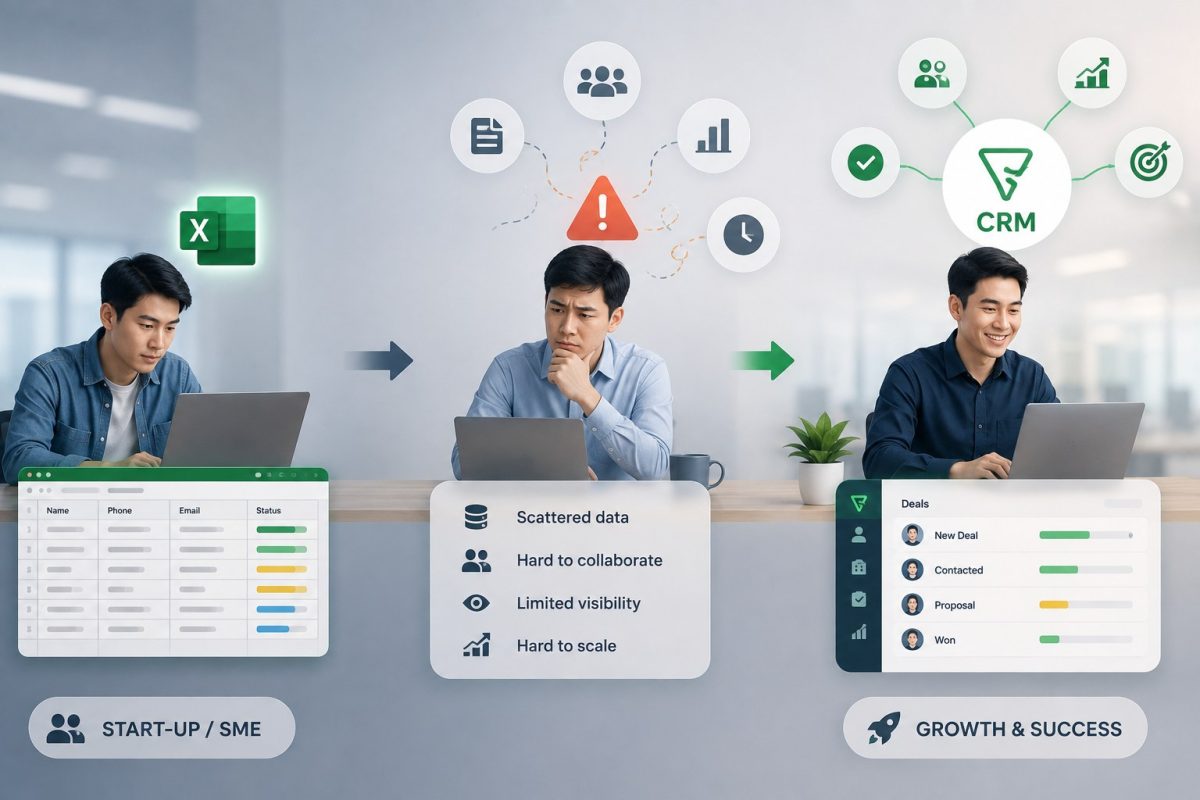
Not every business begins its digital transformation journey with a CRM system. In reality, most startups and SMEs start by using Excel to manage customers, track sales opportunities, and store customer information. This is a practical choice during the early stages, when business operations are still relatively small and sales processes remain simple. However, as businesses grow, customer numbers increase, and Sales teams expand, Excel gradually begins to reveal its limitations in data management and team collaboration.
This is also the point when many businesses start looking for a CRM solution but hesitate because of concerns about investment costs, implementation complexity, and actual business value. In this article, WBL Group explores why Zoho Bigin has become the preferred choice for businesses looking to replace Excel with a simple, effective, and easy-to-deploy Mini CRM.
Excel Is Still the Starting Point for Many Businesses
Looking back at the growth journey of most startups and SMEs, Excel has almost always been the first customer management tool they use. With a simple spreadsheet, businesses can store contact information, record customer requirements, update sales statuses, and maintain lists of prospects.
At this stage, Excel serves operational needs quite well. Organizations typically have small teams, straightforward sales processes, and a manageable number of customers. Choosing Excel keeps costs low, is easy to learn, and requires virtually no implementation effort.
For this reason, using Excel is not a mistake. On the contrary, it is a natural first step for most businesses before they begin thinking about digital transformation.
As Businesses Grow, Excel Begins to Reach Its Limits
What changes is not Excel itself, but the scale of the business.
As customer numbers increase month after month, Sales teams expand, and more people become involved in the sales process, spreadsheet-based management begins to create bottlenecks that businesses may never have encountered before.
Initially, it may take only a few extra minutes to locate customer information. Later, multiple versions of Excel files are saved across different computers. Eventually, no one knows exactly who is responsible for a customer or how far that customer has progressed through the sales journey. When management requests a sales report, the team must manually consolidate information from multiple sources before obtaining a complete business overview.
These challenges do not arise because Excel performs poorly. They appear because the business has entered a new stage of growth that requires a higher level of operational management.
Five Signs That Your Business Has Outgrown Excel
Not every business needs a CRM from day one. However, if your organization begins experiencing the following signs, Excel may no longer be the right solution for your current stage of growth.
1. Customer data is scattered across multiple locations
Customer information is stored in multiple Excel files, user accounts, or devices, making it time-consuming to locate and update records.
2. Every employee manages customers differently
There are no standardized methods for recording notes, updating statuses, or tracking customer activities. As a result, customer handovers become difficult and important information is often lost.
3. Management spends too much time preparing reports
Instead of accessing real-time data, managers must manually consolidate information from numerous spreadsheets before evaluating business performance.
4. It is difficult to monitor the progress of individual sales opportunities
The business knows how many customers it has, but cannot clearly identify which prospects are being consulted, have received quotations, are in negotiations, or are close to closing.
5. Customer handovers depend on individual employees
When employees leave the company or responsibilities change, customer history and communication records are frequently incomplete or lost.
If your business is experiencing three or more of these signs, it may be time to replace Excel with a CRM system that can standardize processes and reduce operational risks.
Excel vs. Zoho Bigin: The Difference Lies in Daily Operations
Many businesses compare Excel and CRM systems based on features. In reality, the biggest difference lies in how they support daily operations.
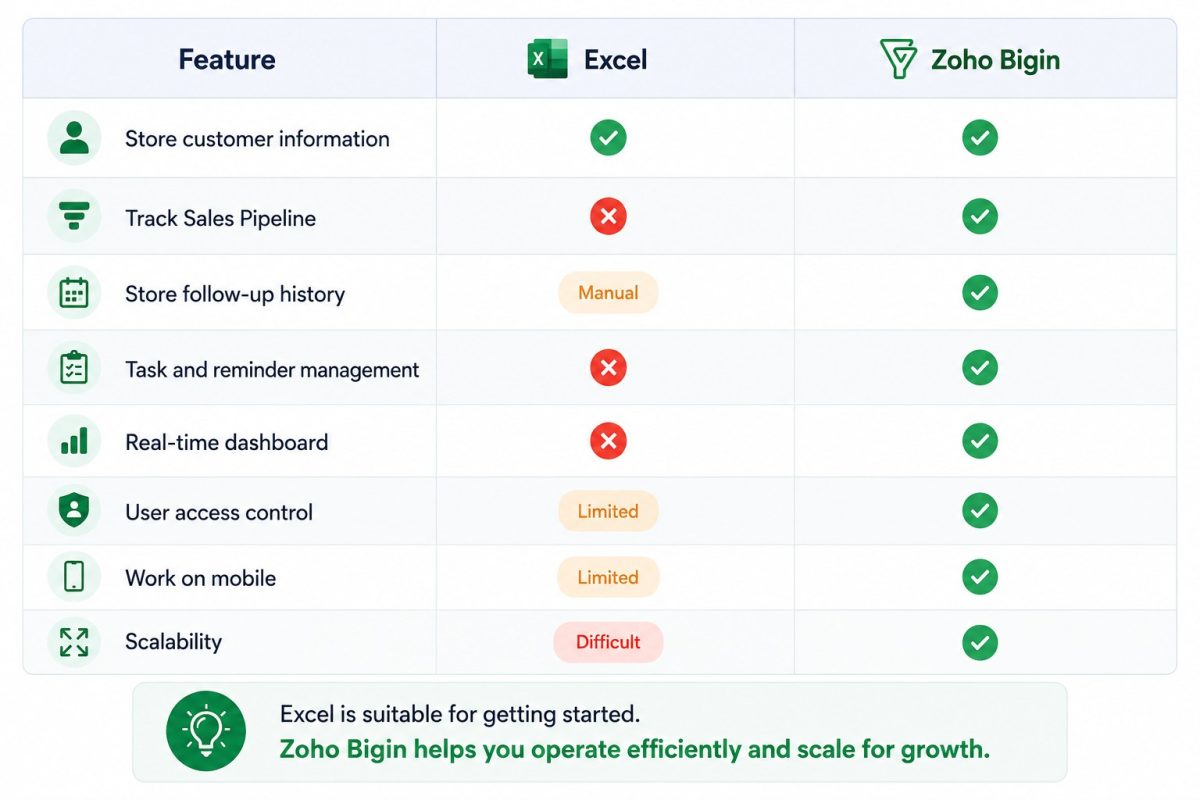
Excel is an excellent tool for storing information, but it was never designed to manage an entire sales process. Zoho Bigin, on the other hand, not only stores customer information but also enables businesses to manage the complete sales journey within a unified system, from the very first customer interaction to the successful completion of a deal.
How Does Zoho Bigin Transform the Way Businesses Operate?
The biggest change when moving from Excel to Zoho Bigin is not simply adopting a new software platform. It is transforming how the Sales team collaborates throughout the sales process.
Instead of each employee maintaining customer records independently, all customer information is managed on one centralized platform. Every sales opportunity has its own dedicated record containing communication history, completed activities, and its current status. When a customer is transferred between Sales representatives or departments, all information remains intact, allowing customer service to continue seamlessly and consistently.
This not only reduces the time spent searching for information but also minimizes the errors that commonly occur when multiple people work with the same customer.
Features Businesses Actually Use Every Day in Zoho Bigin
One of Zoho Bigin‘s greatest strengths is its focus on everyday business activities rather than overwhelming organizations with complex functionality they may never need.
Visual Sales Pipeline
Businesses can build sales pipelines that match their existing workflow. Every customer is displayed within stages such as New Lead, Consultation, Quotation, Negotiation, and Closed Won. Sales representatives simply drag and drop opportunities to update their status, allowing everyone to view progress through the same pipeline.
Centralized Customer Management
Instead of opening multiple Excel files or searching through old messages, all customer information is stored within a single customer profile. Contact details, communication history, emails, phone calls, notes, and related documents are all centralized, enabling team members to continue their work without wasting time searching for information.
Task Management and Activity Reminders
Every sales opportunity includes follow-up activities such as phone calls, quotations, meetings, and post-sales tasks. Zoho Bigin allows teams to manage these activities within the system while providing timely reminders, reducing the risk of forgotten follow-ups or missed opportunities.
Visual Dashboards
Managers no longer have to wait until the end of the week or month to receive reports. Zoho Bigin’s dashboards provide real-time visibility into new customers, sales opportunities, conversion rates, and team performance, enabling faster and more informed business decisions.
Work Anytime, Anywhere
For Sales professionals who frequently meet customers outside the office, mobile access provides a significant advantage. Using a smartphone, employees can update customer records, log meeting outcomes, and review customer history during client meetings without returning to the office.
Which Businesses Is Zoho Bigin Best Suited For?
Not every business needs a full-scale CRM implementation from the beginning. For many startups and SMEs, choosing a solution that matches their current size while supporting future growth is far more important.
Zoho Bigin is particularly well suited for:
- Startups building their first structured sales process.
- SMEs with Sales teams ranging from a few people to several dozen.
- Service businesses managing customers and sales opportunities.
- Educational organizations tracking prospective students and admissions processes.
- Real estate companies managing Leads, projects, and customer follow-up activities.
- Businesses still relying on Excel but looking to transition gradually to CRM without completely changing their current workflow.
It is also an ideal solution for organizations beginning their digital transformation journey with a reasonable investment before expanding into larger enterprise management systems.
A Practical CRM Implementation Roadmap for Startups and SMEs
One of the most common misconceptions is that businesses must implement a comprehensive CRM solution immediately. In reality, digital transformation typically happens in stages, growing alongside the business itself.
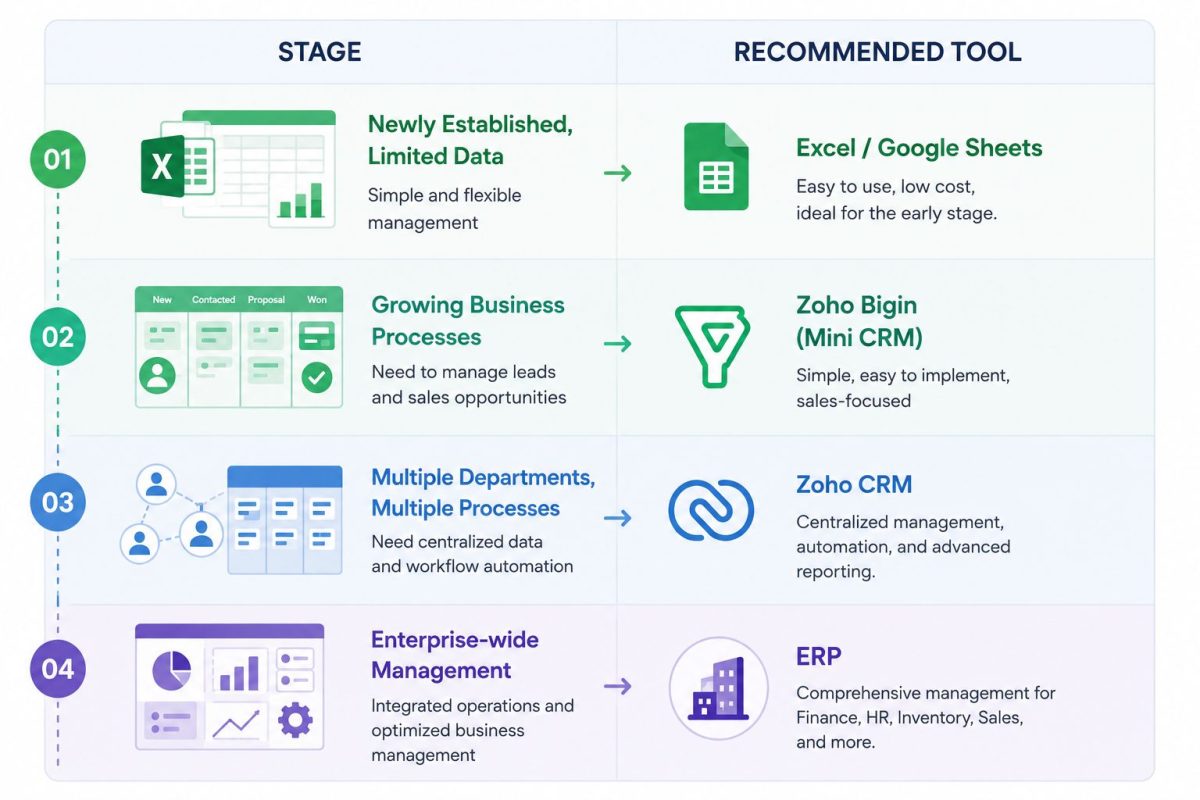
No single system is suitable for every stage of growth. What matters is choosing the right solution at the right time. A Mini CRM such as Zoho Bigin enables businesses to establish a solid data management foundation early while making future expansion much easier without completely changing the way they operate.
The Best CRM Is Not the One with the Most Features
Many businesses spend considerable time comparing CRM platforms based on the number of features they offer. However, a system with hundreds of functions provides little value if the team only uses a small fraction of them.
At the early stages of growth, businesses need a solution that is easy to implement, simple to use, and capable of solving their most pressing sales management challenges. Once teams develop the habit of managing customer information centrally and following standardized workflows, expanding to larger enterprise systems becomes significantly easier and more cost-effective.
With this approach, Zoho Bigin is more than just a Mini CRM. It is the ideal starting point for the digital transformation journey of many startups and SMEs.
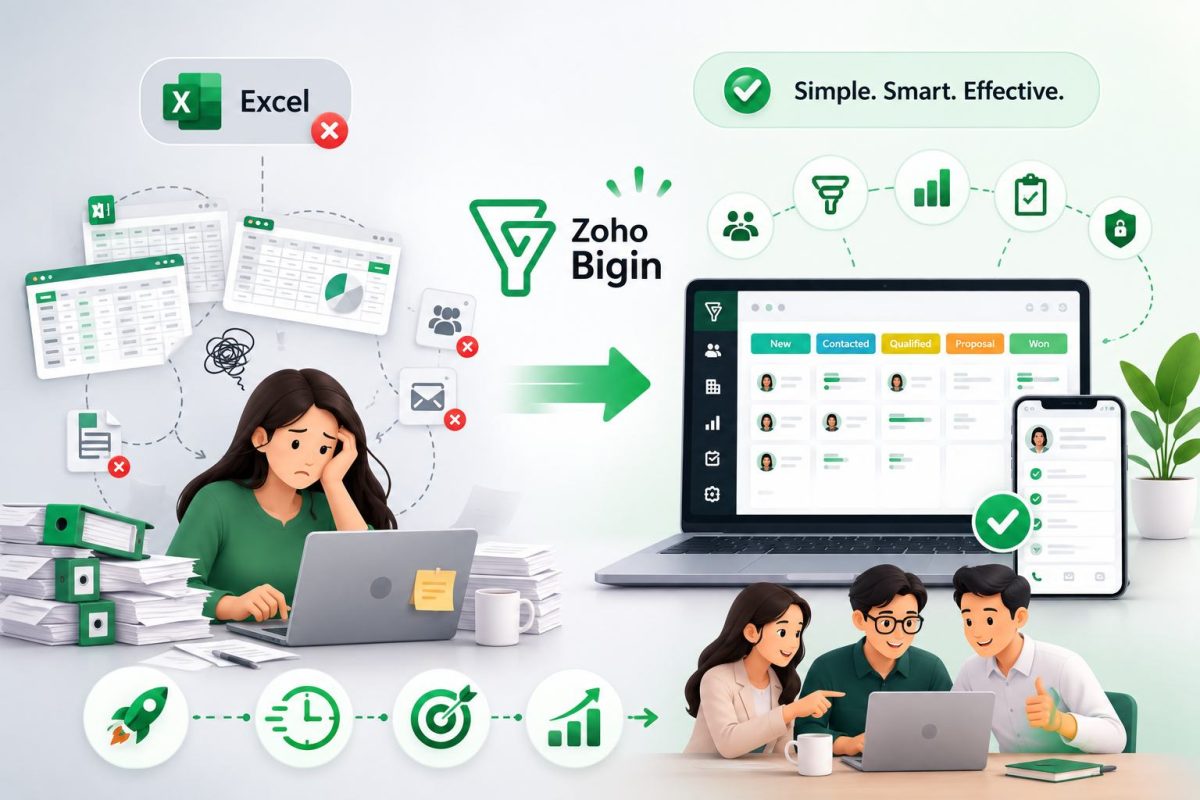
Zoho Bigin was never designed to replace enterprise-level CRM platforms. Instead, it focuses on solving the everyday customer and sales management challenges faced by startups and SMEs. With its intuitive interface, rapid implementation, affordable pricing, and features built around real business needs, Zoho Bigin enables organizations to gradually replace Excel, standardize their sales processes, and establish a centralized customer database from the very beginning of their growth journey.
At WBL Group, we help businesses evaluate their current operations, determine the right time to transition from Excel to CRM, and build digital transformation roadmaps tailored to every stage of growth. Rather than investing in an oversized system from the outset, businesses can begin with a right-sized solution that is practical, easy to adopt, and capable of delivering long-term business value.